Páginas

SyntaxHighlighter

sexta-feira, 6 de julho de 2012

API Java para busca de CEPs (fachada para o serviços dos Correios)

O site dos Correios disponibiliza gratuitamente um ótimo serviço para busca online de CEPs.
Porém, essa é a única forma de acessá-lo: via página HTML.
Não existe, nem é exposta, nenhuma API que facilite a integração desse serviço com outras aplicações.

Para possibilitar esse tipo de integração, criei o busca-cep-java-client que nada mais é que um componente Java (jar) cuja API abstrai a complexidade de:
  1. Fazer a requisição HTTP (GET) passando os parâmetros necessários e;
  2. Processar a resposta - extraindo os dados de CEP do HTML retornado. 
Internamente utilizo a biblioteca HtmlUnit para auxiliar no Web Scraping. Basicamente o que eu faço é simular um usuário que entra na página de busca, preenche e posta o form. Depois, já na tela de resultados, percorro o HTML retornado em busca da tabela com os dados de CEP retornados.

O trecho de código abaixo mostra o quão simples é a utilização da API:

// Obtém uma instância de CEPService
CEPService buscaCEP = CEPServiceFactory.getCEPService();
// Obtém um CEP pelo número
CEP cep = buscaCEP.obtemPorNumeroCEP(13084440);
// Obtém todos os CEPs que contém "Flordalisa" no logradouro
List<CEP> ceps = buscaCEP.obtemPorEndereco("Flordalisa");

Para mais detalhes em como utilizar esse componente, sugiro dar uma olhada nos testes unitários.
Todo o código fonte também está disponível no Github.
Além disso, publiquei a versão 1.1 do componente num repositório Maven (também no Github).
Para quem usa essa ferramenta basta alterar o pom.xml para incluir o repositório:

<repository>
        <id>Talesolutions</id>
        <url>https://raw.github.com/fabito/talesolutions-mvn-repo/master/</url>
        <snapshots>
                <enabled>true</enabled>
        </snapshots>
        <releases>
                <enabled>true</enabled>
        </releases>
</repository>

E adicionar essa dependência:

    <dependency>
      <groupId>org.talesolutions</groupId>
      <artifactId>busca-cep-client</artifactId>
      <version>1.1</version>
    </dependency>

Considerações Finais

O busca-cep-client ajuda a integrar funcionalidades de busca de CEPs à aplicações Java. Principalmente porque dispensa a criação de uma base de CEPs local e como é só uma façade para o serviço oficial dos Correios temos a "garantia" de estarmos sempre acessando dados atuais e corretos.
A principal desvantagem é a dependência da disponibilidade e formato desse serviço - alto acoplamento. Se o site dos Correios sair do ar sua aplicação certamente será impactada. Além disso, como os dados de CEPs são extraidos de uma página HTML, qualquer mudança no markup gerado afetará o funcionamento do componente.

quinta-feira, 12 de abril de 2012

JMeter - Using BSF Assertion to fail samples based on JSON response


I've tested some web applications whose unexpected errors or exceptions were handled by the application code and encoded in the response body as JSON.

A hypothetical response is shown below:

{
    data: null,
    message: "TimeoutException: Transaction rolled back after 3000 seconds.",
    success: false
}

The problem with this approach is that most of the times the HTTP response code is 200 (OK) which  jmeter interprets as a successful sample.
I'm not a big fan of this solution I'd rather have it returning 4XX or 5XX response codes, in which case jmeter would fail the sample.

In order to workaround this, I normally use a BSF Assertion containing javascript code similar to:

try {
   eval('var response = ' + prev.getResponseDataAsString());
   if (!response.success) {
      prev.setSuccessful(false);
      prev.setResponseMessage(response.message);
   }
} catch(e) {
      prev.setSuccessful(false);
      prev.setResponseMessage("Invalid response. Expected a valid JSON.");
}

First I try to evaluate the response string into a valid javascript object. If that succeeds I check the success flag and handle it properly, otherwise, in the catch block, I force the sample to fail due to a bad response format.
Note that in both failure scenarios I invoke the setSuccessful and the setResponseMessage methods to signal a sample failure and have better detailed error messages respectively.

And that's it!
Happy load testing!

JMeter - Changing sample label/name at runtime

When creating jmeter's test plans, sometimes its useful to change the samples names in order to have more accurate and meaningful reports. To achieve this I normally use one of these two approaches:

Using variables (placeholders) in the sampler name

If the variables you need to form the new sample name are already available just fill the the name's text field using the syntax ${variable name}.
The only problem with this approach is that the name shown in test plan tree (left panel) might end up being not so intuitive.


Dynamically setting it in BSF Post Processors

Just use the variable prev (which gives access to the previous SampleResult) and use the method setSampleLabel to set the new label.
In the example below I'm using the value of another variable (named url) previously put in the vars object:

quinta-feira, 9 de fevereiro de 2012

Instalando a slackline (sem árvores) com auxílio de âncora - Parte 2

Comecei a execução do meu projeto.
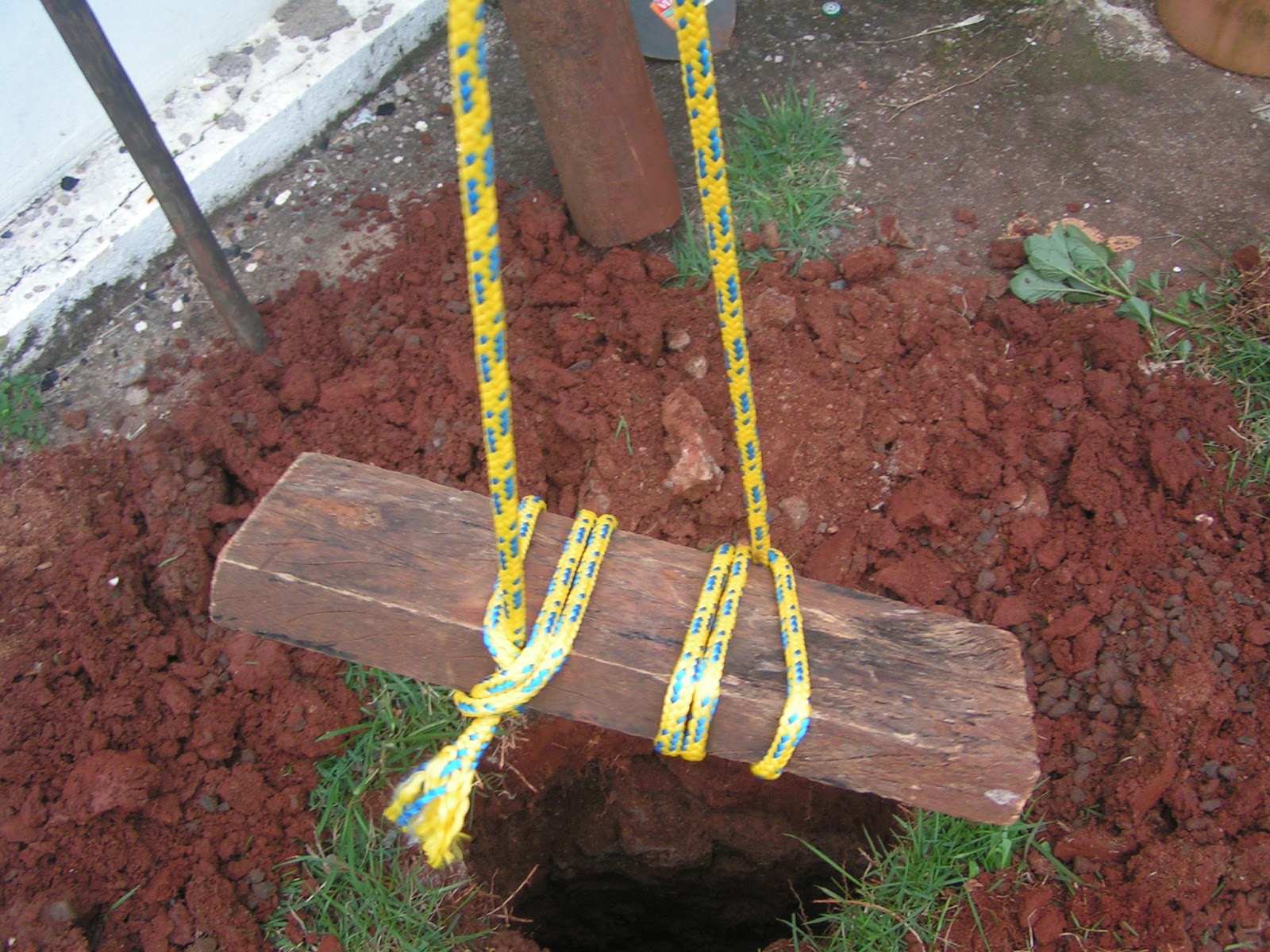
Abaixo algumas fotos do sistema de ancoragem que montei no meu quintal para instalar minha slackline.

1) Escavação


2) Preparando da âncora


3) Enterrando a âncora


4) Finalmente, armando a slack


Slackline / Waterline in the Colombian Caribbean

Slackline and waterline sessions during my last trip to the Colombian Caribbean. 
This video includes waterlining in the Lover's bridge (between Providencia and Santa Catalina Island) and slacklining in Johnny Cay - in San Andres Island.


sexta-feira, 30 de dezembro de 2011

Instalando a slackline (sem árvores) com auxílio de âncora - Parte 1


No meu quintal não existem árvores nem outra estrutura para instalar minha slackline.
Pesquisando um pouco descobri o conceito de dead men anchor que nada mais é que uma âncora, no meu caso de madeira, enterrada a 1,5m de profundidade.
Porém, diferentemente desses vídeos, eu não quero enterrar a slackline. Quero uma solução permanente que permita instalar e desinstalar a fita quando quiser.

Por isso resolvi usar cordas de nylon amarradas à âncora. A ideia é amarrar a slackline nessas cordas e usar algum outro tipo de estrutura bem firme: a-frame, cavalete, tronco ou caixa para erguê-la.

Por enquanto, é só um plano. Segue meus esboços:


Assim que começar o projeto posto por aqui!

sábado, 3 de dezembro de 2011

Importing data from Oracle to Google App Engine Datastore with a custom bulkloader connector

I'm working on a project where we need to upload data from Oracle databases to Datastore very frequently.
The datastore bulkloader  bundled in the App Engine Python SDK works very well for data importing and exporting. It currently offers 3 different connector implementations: csv, xml and simpletext.
CSV connector was working smoothly for us but I wanted to avoid the CSV file generation. I wanted to bulkload directly from Oracle.
After some study I decided to write a new connector: the oracle_connector.
The only pre requisite for using this connector is having the cx_Oracle python module properly installed.
Here are some details about my environment:
  • Ubuntu 11.10 - 64 bits
  • Python 2.7.2+
  • cx_Oracle 5.0.4 unicode
  • Oracle Instant Client 11.2
  • Google App Engine Python SDK 1.6.0
Some design decisions

I wanted to specify a sql query for every kind/entity in the yaml config file and then map the returned (selected) column names or aliases to the properties via the external_name attribute. I didn't find a way to use a custom connector_options like "sql_query" so I used the existent columns option to inform the query.
I also wanted to have the database connection properties to be outside the connector implementation. In order to achieve that I decided to store these configurations in an external file which is passed through the command line "--filename" parameter to the appcfg.py script.

The actual implementation

It is basically comprised of 3 files:
  • bulkloader.yaml - imports and utilizes the oracle_connector as well as maps queries to entities
  • oracle_connector.py - connector implementation based on cx_Oracle (doesn't work for exports)
  • db_settings.py - defines connection properties variables used by oracle_connector
Invoking the bulkloader is very simple:

$APPENGINE_HOME/appcfg.py upload_data --config_file=bulkloader.yaml --kind=Table --filename=db_settings.py --email=user@gmail.com --url=http://app-id.appspot.com/remote_api

The bulkloader.yaml below shows how to import and use the oracle_connector. Also note the connector_options attribute.

python_preamble:
- import: base64
- import: re
- import: oracle_connector
- import: google.appengine.ext.bulkload.transform
- import: google.appengine.ext.bulkload.bulkloader_wizard
- import: google.appengine.ext.db
- import: google.appengine.api.datastore
- import: google.appengine.api.users

transformers:

- kind: Table
  connector: oracle_connector.OracleConnector.create_from_options
  connector_options:
    columns: "select TABLE_NAME, TABLESPACE_NAME, LAST_ANALYZED from user_tables"
  property_map:
    - property: __key__
      external_name: TABLE_NAME

    - property: tablespace
      external_name: TABLESPACE_NAME

    - property: last_analyzed
      external_name: LAST_ANALYZED

There are some known issues here: 1) you must use uppercase strings in the external_name attribute and 2) I wasn't able to return number columns (had to use to_char oracle function) due to some problem in my cx_Oracle installation.

Below, the OracleConnector class which implements the connector_interface.ConnectorInterface. This was my first piece of python code. Let me know if I can improve it!

#!/usr/bin/env python
"""A bulkloader connector to read data from Oracle selects.
"""
from google.appengine.ext.bulkload import connector_interface
from google.appengine.ext.bulkload import bulkloader_errors
import cx_Oracle
import os.path

class OracleConnector(connector_interface.ConnectorInterface):

  @classmethod
  def create_from_options(cls, options, name):
    """Factory using an options dictionary.

    Args:
      options: Dictionary of options:
        columns: sql query to perform, each selected column becomes a column
      name: The name of this transformer, for use in error messages.

    Returns:
      OracleConnector object described by the specified options.

    Raises:
      InvalidConfiguration: If the config is invalid.
    """
    columns = options.get('columns', None)
    if not columns:
        raise bulkloader_errors.InvalidConfiguration(
            'Sql query must be specified in the columns '
            'configuration option. (In transformer name %s.)' % name)

    return cls(columns)

  def __init__(self, sql_query):
    """Initializer.

    Args:
      sql_query: (required) select query which will be sent to database. The returned columns/aliases will be used as the connectors column names
    """
    self.sql_query = unicode(sql_query)

  def generate_import_record(self, filename, bulkload_state):
    """Generator, yields dicts for nodes found as described in the options.

    Args:
      filename: py script containing oracle database connection properties: host, port, uid, pwd and service.
      bulkload_state: Passed bulkload_state.

    Yields:
      Neutral dict, one per row returned by the sql query
    """
    dbprops = __import__(os.path.splitext(filename)[0])
    dsn_tns = cx_Oracle.makedsn(dbprops.host, dbprops.port, dbprops.service)
    connection = cx_Oracle.connect(dbprops.uid, dbprops.pwd, dsn_tns)
    cursor = connection.cursor()
    cursor.arraysize = dbprops.cursor_arraysize
    cursor.execute(self.sql_query)
    num_fields = len(cursor.description)
    field_names = [i[0] for i in cursor.description]
    for row in cursor.fetchall():
       decoded_dict = {}
       for i in range(num_fields):
         decoded_dict[field_names[i]] = row[i]
       yield decoded_dict    
    cursor.close()
    connection.close()

And finally the contents of db_settings.py:

uid=u'database_username'
pwd=u'database_password'
host="database_host"
port=1521
service="service"
cursor_arraysize = 50

Get the code

You can download the code here:

https://github.com/fabito/gae_bulkloader_connectors

Summary

This post shows an alternative connector implementation for importing data directly from an Oracle database.
This approach could be easily extended to support other RDBMS such as MySQL or Postgres.
We still have to perform some tests to check how it will behave under different loads and data types but so far, it seems promising.

References